


.png)
As a kid, I loved sci-fi and dystopian novels. I devoured The Hunger Games, Divergent, 1984, Fahrenheit 451… I was fascinated by that ethical frontier of technological development: the point where science stops being a promise and starts becoming a dilemma.
When the generative AI boom kicked off, back in late 2022, I felt that same mix of awe and vertigo. For the first time, what I'd only imagined in my novels was starting to come true. And although in these three years we've already gotten used to coexisting with machines that respond like humans, there are still moments when technology leaves us speechless.
The launch of ChatGPT's agent mode has been one of those moments. A mix of excitement (because the possibilities are huge) and respect (because the ethical and security implications are no small matter). In this article I want to explain what this new mode is, how it works, and what precautions you should keep in mind if you're tempted to try it.
What is ChatGPT's agent mode
The agent mode is one of the most powerful features OpenAI has launched in recent months. Until now, ChatGPT behaved like a conversational assistant: you gave it an instruction ("write me an email," "summarize this text," "analyze this ad") and it answered inside the chat itself.
With agent mode, that dynamic changes. ChatGPT stops being a mere conversational partner and turns into a kind of autonomous agent, able to act outside the chat. It can open web pages, interact with external tools and even execute steps automatically.
The most interesting part is how it does it: when you turn on agent mode, a mini-screen or secondary desktop opens inside ChatGPT itself. From there, you can watch the AI work in real time: it opens tabs, browses websites, gathers information, takes actions… It's mesmerizing.
You're no longer telling it what to do step by step. You give it a goal, a mission, and the agent draws up its own plan to accomplish it. You can also supervise the process at any time; you can review it, modify it, or pause it in real time.
How it differs from the ChatGPT we already knew
Until now, ChatGPT was basically reactive: you wrote a prompt and it replied. If you wanted it to do something complex, you had to guide it step by step. Agent mode flips the roles: you don't give it concrete instructions, you give it a general goal. For example:
"Find potential clients on LinkedIn for a digital marketing agency in San Sebastián."
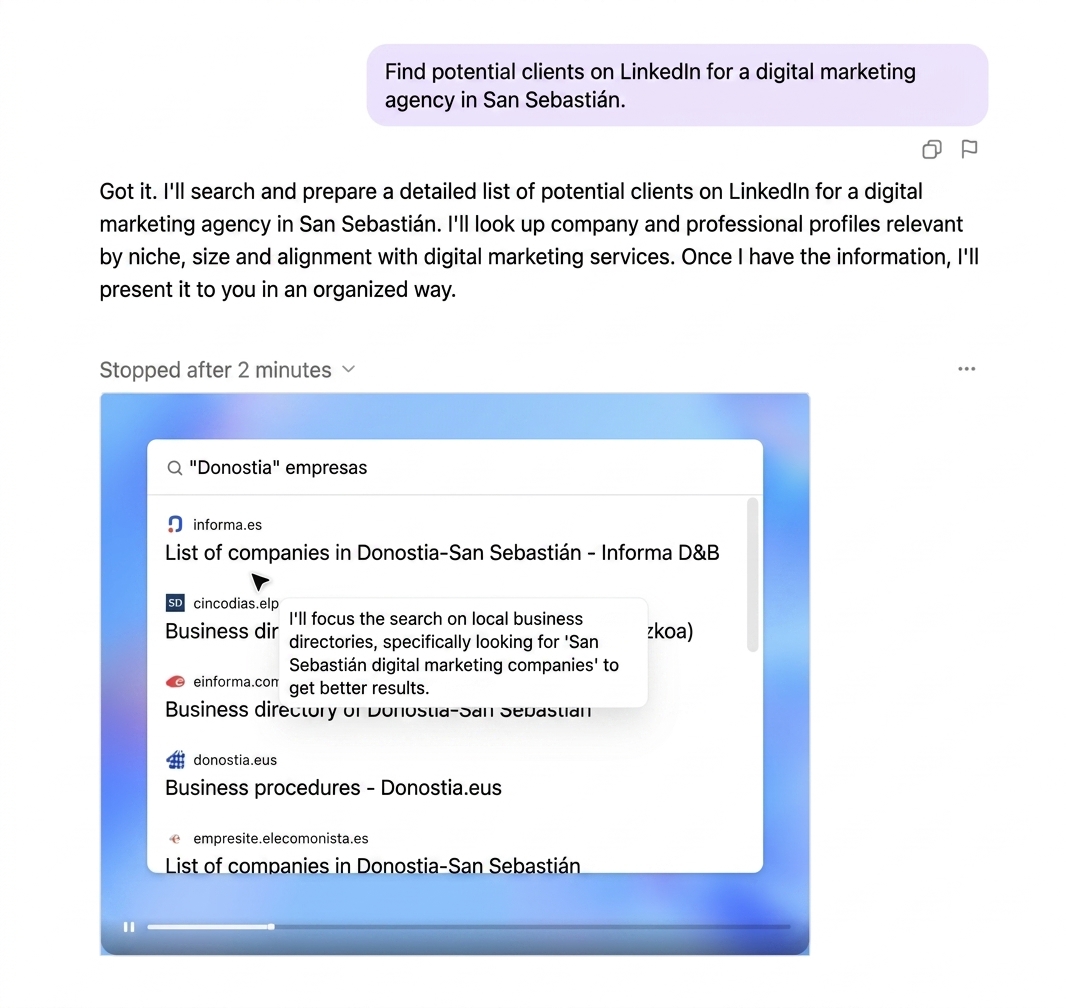
And the agent, after understanding what you're asking, goes into LinkedIn, logs in (with your authorization), runs the search, analyzes the profiles and can even export the information to an Excel file or a Google Drive document.
Another example:
"Compare the prices of these products at three different supermarkets and buy each one at the cheapest."
The agent opens the three supermarket websites, looks up the products, adds each one to the corresponding cart and leaves everything ready for you to just confirm the purchase.
The brain… and the arms
A nice way to grasp this leap is with a simple metaphor. Until now, ChatGPT was a brain: you asked it to think, to analyze, to write… and it did so inside the chat. But now that brain has arms — it can "go out" on the internet and act. It can:
- Create a spreadsheet in your Google Drive.
- Write and save a draft email in your inbox.
- Send messages on LinkedIn to the leads it has found.
- Automate tasks that previously required several tools or a lot of manual time.
And for marketing professionals, this is a real revolution. Here's a table so you can see the differences at a glance.

How to use ChatGPT's agent mode safely
Great power comes with great responsibility — and great risks. Here are the main ones:
1. Be careful with credentials
For the agent to access external tools, you'll sometimes need to log in. If, for example, you want it to enter LinkedIn or Gmail, you'll have to give it your access details.
👉 Tip: never use your personal accounts. Create secondary or test accounts with minimal data. That way you won't put your information or your professional network at risk.
2. Prompt injection
As it browses the web, the agent may run into manipulated pages trying to trick it into giving up your personal data. Although OpenAI has put protections in place, the risk is still there.
👉 Tip: avoid asking it to visit unknown websites or interact with untrustworthy domains.
3. Constant supervision
Agent mode acts autonomously, but you stay in control. If you see it starting to do something you're not happy about, you can stop it at any time. It's worth supervising its actions, especially when it handles sensitive information.
👉 In short: agent mode is a hugely powerful tool, but it also demands an extra dose of digital responsibility. Follow these tips and you'll be amazed at what it can do.
The impact of agent mode on marketing
What impact does ChatGPT's agent mode have for those of us who live among funnels, KPIs and ad campaigns? Because we're not just talking about technological progress — we're talking about a tool with real potential to transform how we do digital marketing.
- Need to spy on the competition without looking like you've got too much free time? Agent mode can crawl websites to detect price changes, new product launches or suspicious tweaks in their claims.
- Want to stop improvising on social media? Have it create your publishing calendar, align it with key dates and suggest content ideas based on search trends pulled from Google Trends.
- Curious about what people are saying about your brand (without spending the afternoon in obscure forums)? Have it pull and summarize conversations from Reddit, Twitter or any place where your reputation is at stake.
In short, agent mode handles tasks that would normally take a whole marketing team doing dull, repetitive work — but more efficient and faster. It frees your time from the routine so you can focus on strategy and adding real value.
So after everything we've seen, here's the question… is it worth trying agent mode? For me, it's a resounding yes!

